6 Best Free Backup Software for Windows in 2026

6 Best Free Backup Software for Windows in 2026
https://www.cybersecurity-insiders.com/6-best-free-backup-software-for-windows-in-2026/
Publish Date: 2026-06-03 23:52:00
Source Domain: www.cybersecurity-insiders.com
Most backup guides lead with the paid options. This one doesn’t. There’s enough solid free software covering Windows backup – from full disk images to scheduled cloud uploads – that you don’t have to spend anything to get a real backup strategy running. The six tools below were chosen specifically for Windows environments, across three different user profiles: home users who want something that just works, freelancers who need commercial-use licensing, and technical users who’d rather configure everything themselves.
One thing to flag upfront: “free” means different things for different tools. Some are genuinely free with no storage or licensing strings attached. Others are personal-use-only. The table below captures the key distinctions before you dive in.
At a Glance
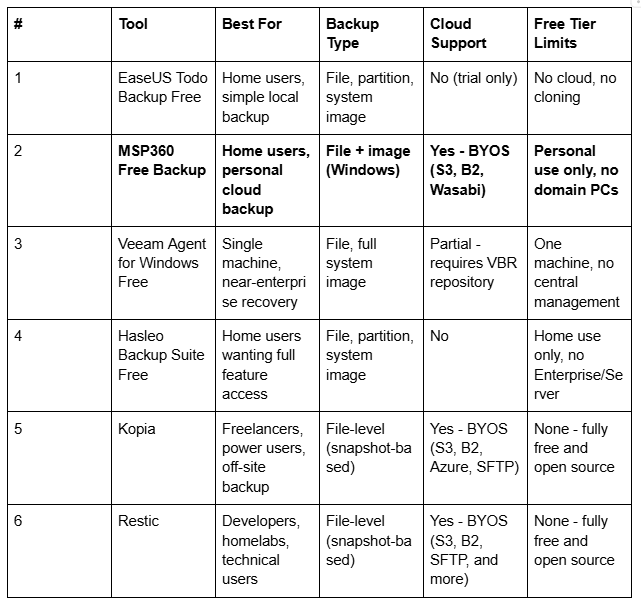
Who Should Read This
Home users and individuals. If you want something installed and running in under 20 minutes without touching the terminal, start with EaseUS or Hasleo.
Freelancers and small businesses. The license matters as much as the features. Most free backup tools are personal-use-only. Kopia is the exception here: open-source, commercially licensed, and capable of serious off-site backup.
Power users and homelab operators. Restic and Kopia give you full control over storage, encryption, scheduling, and retention. More setup, but nothing artificial gets in the way.
What to Look Out For
Before picking a tool, it helps to know what actually separates good free backup software from the stripped-down kind.
Backup type matters first – there’s a real difference between file-level backup (copies specific files and folders) and image-based backup (captures the full disk state, bootable for bare-metal recovery). Some tools do both; some don’t.
Incremental backup support keeps storage from ballooning after the first run – only changed data gets added each time. All six tools here support this in some form.
Storage destinations vary significantly….