Texts between iPhone and Android get more secure as Apple rolls out iOS 26.5
Texts between iPhone and Android get more secure as Apple rolls out iOS 26.5
https://www.theshortcut.com/p/apple-ios-26-5-iphone-android-rcs-encryption
Publish Date: 2026-05-12 08:47:00
Source Domain: www.theshortcut.com
(Credit: Apple)
-
🍎 Apple has released iOS 26.5 with end-to-end RCS encryption support
-
📲 This means that texts between iPhones and Android will be much more secure
-
🧪 The feature is still in beta and is slowly rolling out to users on supported carriers
-
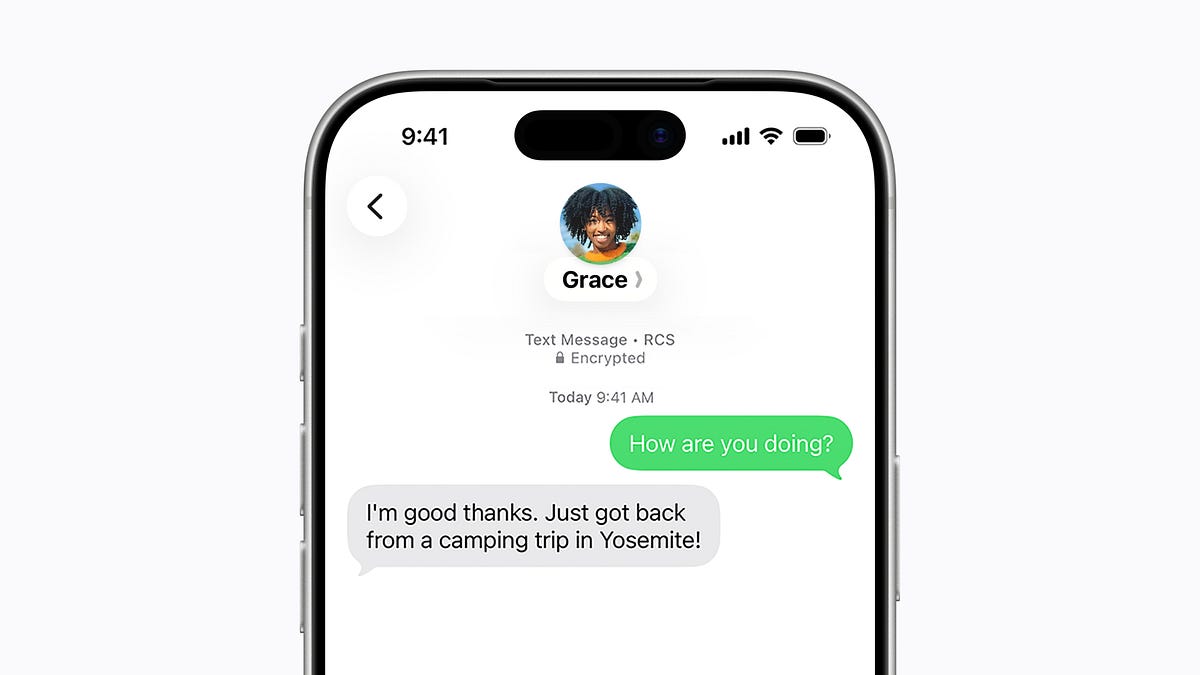
🔒 You’ll know your conversation is encrypted when you see a lock icon above your messages
One of the biggest perks of using iMessage to text your friends is its end-to-end encryption, which keeps each message secure and hidden from prying eyes. Now, that same feature is coming to texts between iPhones and Android phones with RCS.
Apple has begun rolling out iOS 26.5, a software update for the iPhone that includes end-to-end encryption for RCS. The texting standard was originally released in iOS 18.1 for iPhone users, but up until now, it hasn’t been nearly as secure as it is when texting between Android phones, since Google Messages has had built-in support for it for years.
Starting with iOS 26.5, your texts between your iPhone and your “green bubble friends” will be more secure. However, there are a couple of things to note. End-to-end encryption is technically in beta, meaning it’s not quite production-ready and there could be some bugs with it. It’s also taking its sweet time rolling out; Apple is gradually releasing the feature to users on supported carriers over time, so if you don’t have access to it right after you install iOS 26.5, chances are you’ll have to wait a bit longer.
To use end-to-end encryption with RCS, you’ll need to go to Settings Messages RCS Messaging and toggle on “End-to-End Encryption (Beta)”. Afterward, future messages will be secured and won’t be visible to Apple, your carrier, hackers, and more. You’ll know that the feature is working when you see a little lock icon at the top of your text thread.
As the feature continues rolling out, Apple says it’ll be enabled by default, so there’s a chance you won’t need to manually turn it on.
Apple listed the…