The smartest ways to sync your Android and computer clipboards – Computerworld

The smartest ways to sync your Android and computer clipboards – Computerworld
https://www.computerworld.com/article/4161538/sync-android-computer-clipboards.html
Publish Date: 2026-04-24 12:46:00
Source Domain: www.computerworld.com
Once you’ve got whatever you’re seeing into Lens, you can then press and hold any text within the image there to select it.
Google Lens makes it easy to select text from within any image on Android.
JR Raphael, Foundry
Then, tap the three-dot menu icon within the text selection menu that appears — and hey, how ’bout that? Tucked away there, where no reasonably sane person would ever think to look, is a handy little command called “Copy to computer.”
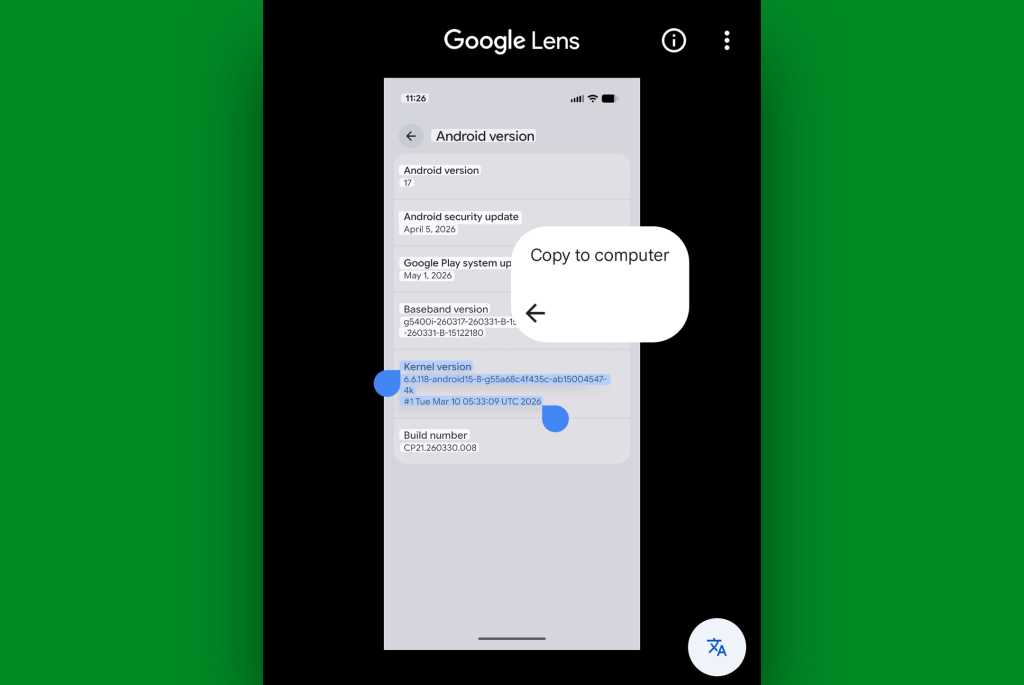 Lens has its own tucked-away “Copy to computer” option for quick clipboard syncing. Who knew?!
JR Raphael, Foundry
Tap that bad boy and tap it good, and you’ll be able to choose from any computer where you’re currently signed into Chrome with the same Google account — Windows, Chromebook, Mac, Linux, you name it — and after that, the text from that image will be on your computer’s clipboard and ready to paste wherever.