I found the Linux tool that shows what’s using your disk space — and lets you clean it up instantly
I found the Linux tool that shows what’s using your disk space — and lets you clean it up instantly
https://www.makeuseof.com/found-linux-tool-shows-whats-using-disk-space-lets-you-clean-instantly/
Publish Date: 2026-06-30 12:00:00
Source Domain: www.makeuseof.com
Once your SSD starts filling up, you start the tedious task of finding out what’s taking up space. I’ve used several graphical tools for this on Linux, but they often take a long time to index and require a series of mouse clicks to surface the main culprit.
I tried ncdu, a lightweight terminal analyzer, and within seconds, it scanned my entire system. Using the arrow keys, I was able to hunt down the storage hogs almost immediately. For these use cases, it’s become my go-to tool for finding and purging bloat on Linux.
Running out of storage is only half the problem
Finding what’s eating your disk is usually the frustrating part
Afam Onyimadu / MUO
I thought the fix for a storage problem would be obvious the first time it happened to me. However, I’ve come to understand that storage doesn’t typically run out in a single dramatic event. It is usually a gradual process, triggered by one growing log here, a bloated cache folder there, and some forgotten apps or tools somewhere else. You don’t always know where the storage went until there is a problem.
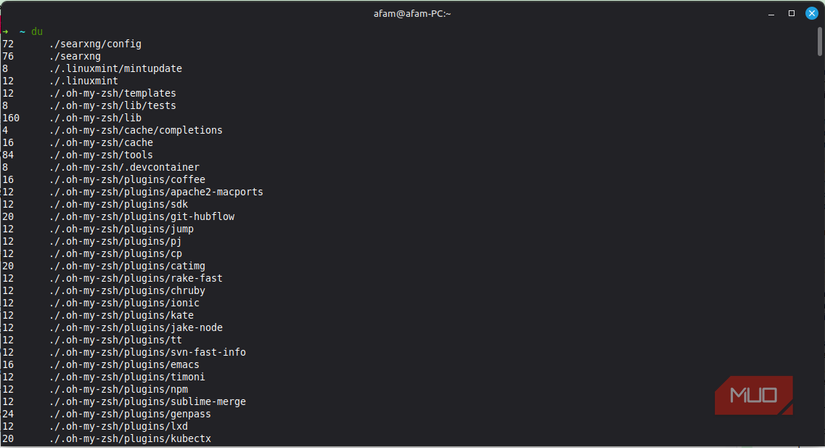
For most people, df is the first command to reach for in these situations. It simply shows the disks and how full they are. But this is just the first phase because it doesn’t explain why. So you then proceed to du, but this is typically the beginning of more frustration. It presents a wall of output when you run it on a directory; then…