My photos were always crooked until I found this hidden iPhone camera trick

My photos were always crooked until I found this hidden iPhone camera trick
Publish Date: 2026-02-28 01:34:00
Source Domain: www.tomsguide.com
Hidden iPhone tips
(Image credit: Future)
Hi, I’m Kaycee. Welcome to Hidden iPhone Tips, a weekly column where I dig into the best iOS features Apple doesn’t tell you about.
Nothing ruins a good photo faster than realizing it’s crooked. You frame the shot carefully, snap the picture, and only notice later that the horizon is tilted or the building leans at an odd angle. By then, it’s too late to retake it, and while you can rotate photos afterwards, cropping to straighten them reduces image quality and cuts off parts of the frame.
The level feature displays on-screen indicators that show exactly when your iPhone is perfectly straight. Once enabled, you’ll never take another crooked photo by accident. Here’s how to turn on iPhone’s camera level and why it’s genuinely useful.
You may like
How to enable camera level on iPhone
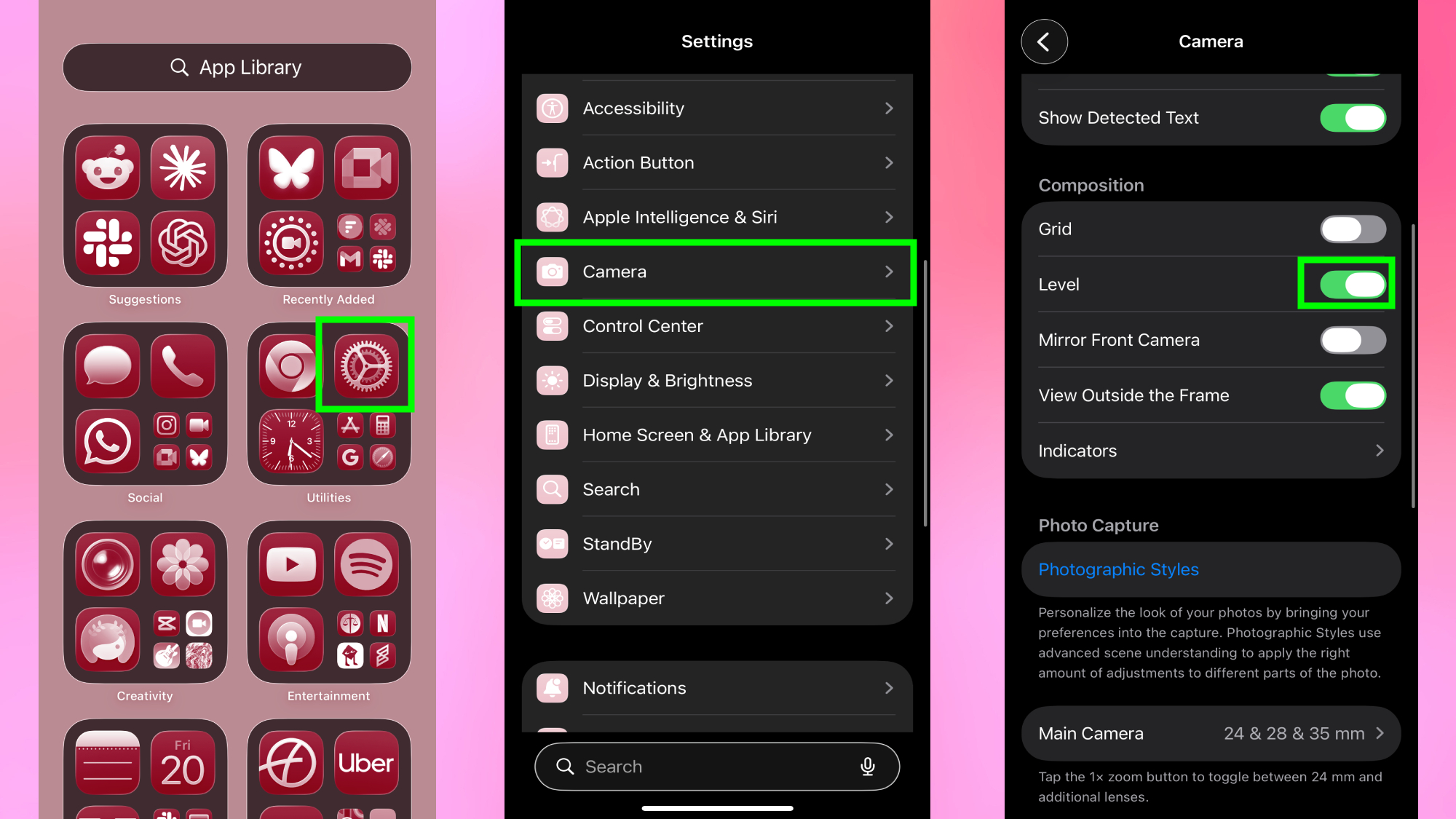
Open the Settings app on your iPhone and scroll down until you find Camera. Next, tap Camera to open the camera settings menu. Look for the Level option in the Composition section. Toggle Level on.
Now open your Camera app and point it at any scene. You’ll notice crosshairs or lines overlaid on your screen — that move as you tilt your iPhone.
Tilt your phone up, down, left, or right and watch how the lines shift. When the two crosshairs align perfectly and both turn yellow, your iPhone is level. This works both for landscape and portrait orientation.
The level stays active whenever you use the Camera app. It appears in Photo mode, works in Video mode, and even functions in other camera modes. You don’t need to toggle it on and off, it’s just always there when you need it.
Why this feature is genuinely useful
Once enabled, the level requires zero effort. You’re already looking at your screen to frame your shot anyway. Glancing at whether the lines match requires virtually zero mental output but…