This one Android feature made using Incognito mode in Chrome so much easier
This one Android feature made using Incognito mode in Chrome so much easier
Publish Date: 2026-02-22 04:00:00
Source Domain: www.tomsguide.com
Google’s Incognito mode is one of the best means to keep your web browsing private, while also making sure that you’re not hindered by prior search data while searching Google. However, the best Android phones can make it even more secure.
While Google Chrome and Incognito mode are available on any device, users with a Samsung or Google Phone can lock their tabs behind their PIN or even Face Recognition. In comparison, iPhones will hide the pages, but you only need to press a button that appears to see all the tabs.
You may like
How to lock Incognito mode on Android phones
Find the Settings option
The first thing you need to do is access the Google Chrome app, then press the three-dot menu in the top right corner and select the Settings option.
Navigate to the relevant section and find the toggle
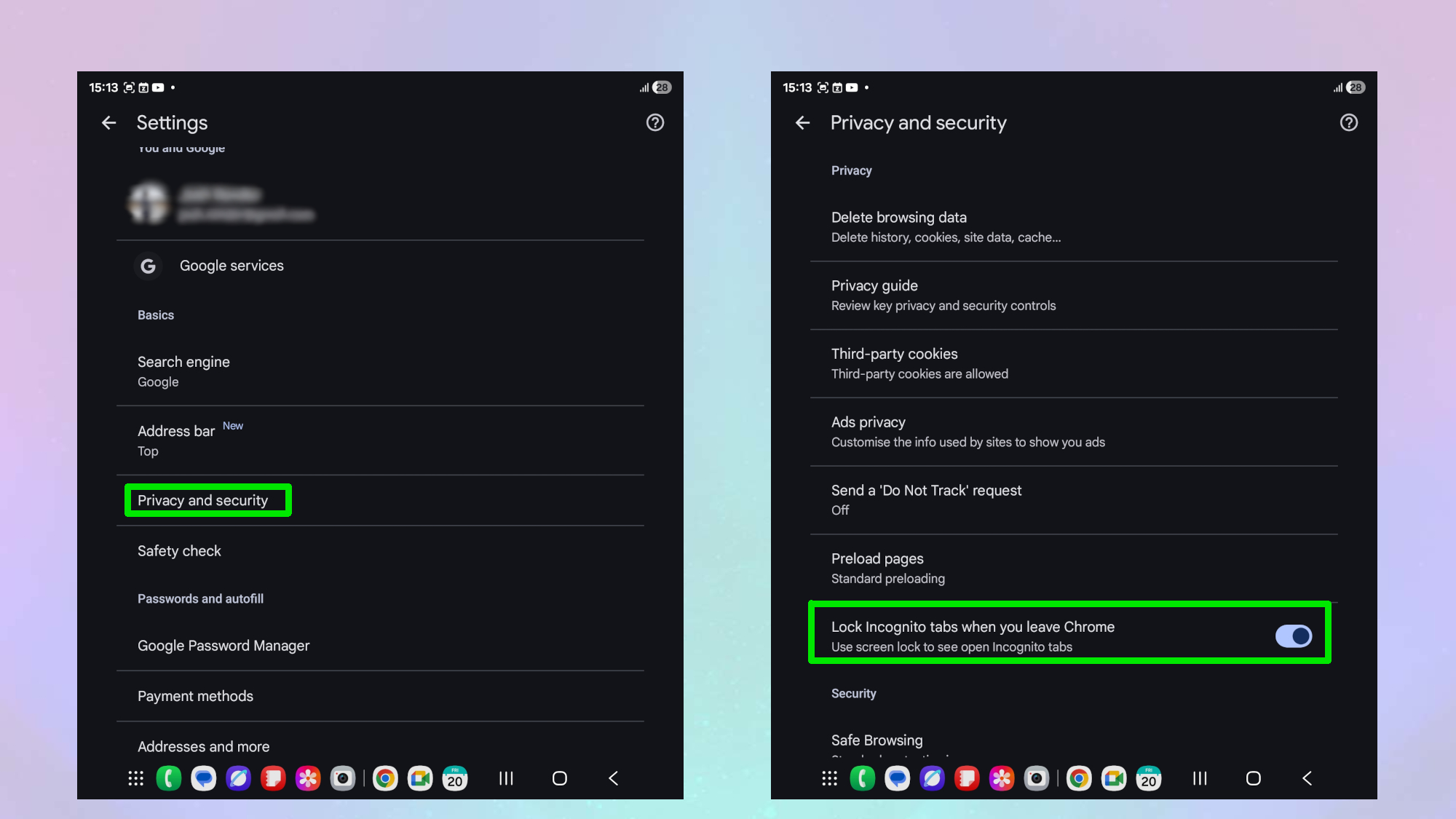
Once in the Settings menu, navigate to Privacy and Security. Once you’ve tapped that, you’ll need to scroll until you see the option to toggle “Lock Incognito tabs when you leave Chrome.”
Once you have activated the toggle, you’ll be asked to confirm your identity using either your Face Recognition, PIN or pattern. From then on, anyone who wants to see your incognito tabs will require the same means each time.
This is the kind of addition that I would want to see more of, as it doubles the security of Incognito mode. For instance, if you’re looking to hide your holiday shopping for a family member, then this is just an added layer of security.
However, it is worth noting that, while Incognito mode doesn’t store cookies or appear on your history, it doesn’t stop websites, employers, or ISPs from tracking your activity, and data may remain in network logs or system caches.
If you want more privacy, then you would be better served…


