Leaked images show more changes coming to Android 17
Leaked images show more changes coming to Android 17
https://www.phonearena.com/news/leaked-images-show-android-17-changes_id177697
Publish Date: 2026-01-26 22:54:00
Source Domain: www.phonearena.com
Yesterday we told you that a new report says that Android 17 will add more blurs to the interface background on system-level applications. What’s the point of doing this? It prevents the user from getting distracted by text, elements, and images on the page in back of the one you’re looking at. The blur is certainly less distracting than a solid color. In a way, the translucent design in the background might remind you of Liquid Glass in iOS 26 although the latter looks wet compared to a frosted look for Android 17.
There’s a new look for the Screen Recording feature in Android 17
The power menu will be translucent on Android 17 and with the background blurred out, the app icons on the bottom of the screen cannot be identified. The Android 17 screen leaks come from X subscriber @RKBDI. Another leak showed a new look for screen recording. The current UI is a bit chunky and clunky with Quick Settings in the background. In Android 17, this feature uses a floating pill. Tap on “Entire screen” and that brings up these options: “Record device audio, Record microphone, and Show touches.”
The status bar timer is still part of the new look screen recording UI, and a tap on the screen while recording brings back the pill. Eventually, a preview screen surfaces from where you can edit or share the on-screen recording you’ve made.
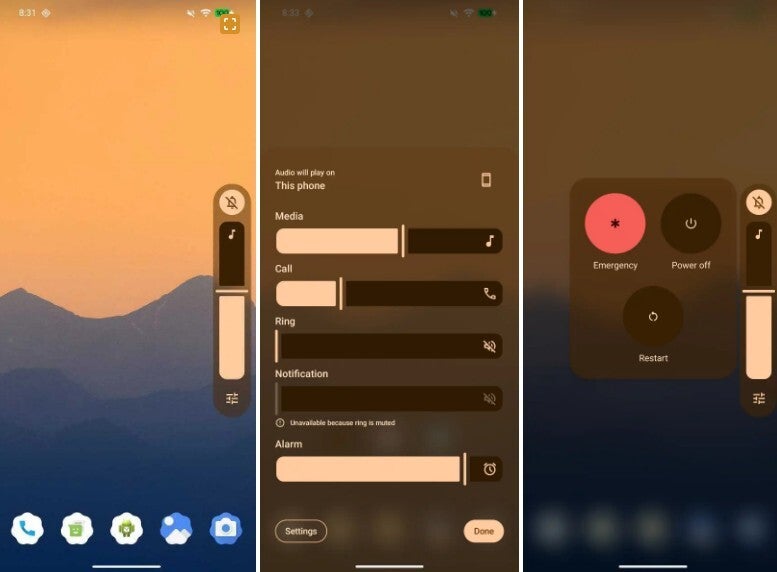
Blur backgrounds are coming to Android 17. | Image credit-@RKBDI
Quick Settings and the Navigation Shade are getting separated in Android 17
Android 17 has the codename of “Cinnamon Bun,” and among the changes we expect to see is the separation of Quick Settings and the Notification Shade. Currently, swiping down from the top of the display shows you Quick Settings panels on top with notifications underneath. In Android 17, these Siamese twins can be broken up by going to Settings …