Developer Turns Azure Linux 4 Into Bootable Desktop-App
Developer Turns Azure Linux 4 Into Bootable Desktop-App
https://winbuzzer.com/2026/06/07/azure-linux-desktop-boots-a-linux-gui-inside-windows-xcxwbn/
Publish Date: 2026-06-07 14:31:00
Source Domain: winbuzzer.com
TL;DR
- Prototype Demo: Hayden Barnes built Azure Linux Desktop as an experimental Windows app that boots an Azure Linux 4.0 desktop.
- Display Path: The app uses Microsoft’s wslc container layer, XFCE, XRDP, and Remote Desktop Protocol plumbing to show the session.
- Production Caveat: Unstable WSL builds and Fedora package workarounds keep the project outside supported Microsoft desktop Linux territory.
- Developer Context: Microsoft’s WSL container plan targets more manageable Linux-container workflows for Windows developers and administrators.
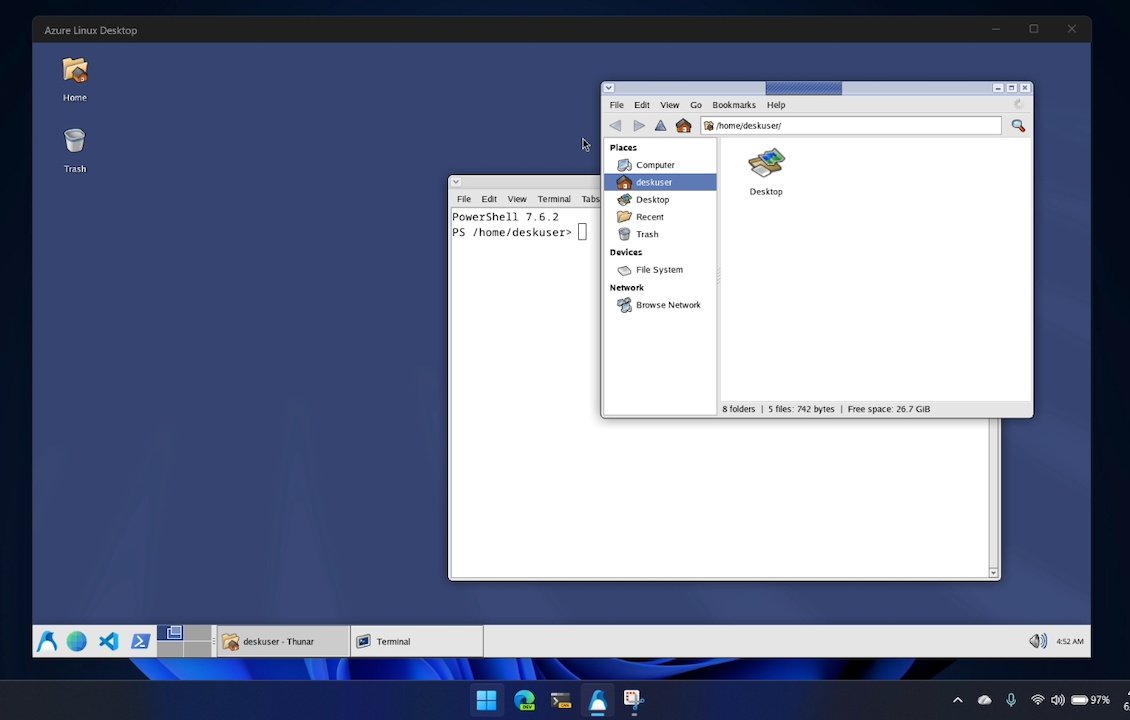
Author and project developer Hayden Barnes has built Azure Linux Desktop as an experimental Windows app that boots a full Azure Linux desktop inside a window. Barnes’s June 6 prototype puts Microsoft’s Fedora-derived Azure Linux 4.0 under the lightweight XFCE desktop environment, but he set the boundary plainly: “It is a toy.”
The demo gives Windows Subsystem for Linux developers a GUI test case. An embedded wslc container runs Azure Linux 4.0, and XFCE presents the Linux session inside Windows while the project stays outside supported Microsoft desktop Linux territory.
How the Windows-Hosted Linux Desktop Works
Azure Linux Desktop is a .NET 10-based WinUI 3 app that starts an embedded wslc container based on Azure Linux 4.0 and boots into XFCE. Wslc provides the Windows-side container layer for Linux containers, while XFCE supplies the visible Linux desktop that appears after launch.
Inside the app window, the prototype combines wslc, WinUI Reactor, Azure Linux 4.0, .NET 10, Windows App SDK packaging, and the Windows Remote Desktop Protocol ActiveX control. Azure Linux Desktop starts an XRDP server inside the container, connects over loopback, and places the Windows RDP client over the app window after the Linux session is ready.
The remote-desktop path makes the Linux session look native while a borderless WinForms host keeps the display outside the WinUI tree. Practical features such as working audio and…