This simple Android change could help Pixel 10 users save cloud storage without deleting photos or videos

Publish Date: 2026-06-05 12:14:00
Source Domain: www.phonearena.com
was enable its built-in backup function. It ensures that valuable data is not lost even when I lose access to the device on which it is stored.
However, there is a big issue with how the backup feature currently works on all Android devices, including Pixels. It is basically an all-or-nothing affair. Fortunately, this could change very soon if the recent finding pans out to be true.
Here’s why Android’s current backup feature isn’t the best
Backing up data on any Android smartphone is very easy. The exact steps could differ depending on the skin your phone uses, but the general rule of thumb is to open the Settings app, choose System, and then Backup. The main problem here is that you don’t get total control over exactly what you could back up.
On Pixel phones, for instance, if you open the “Other device data” option, then you will see that you are only allowed to either back up all kinds of other data or nothing at all. This other data includes things like call history, device settings, text messages, and data related to different apps.The unavailability of individual toggles means oftentimes you end up backing up data that you don’t really need. This eventually results in unwanted things taking up valuable space in your cloud storage that could have otherwise been used by other data that you really want to back up.
A much-needed change is on the way
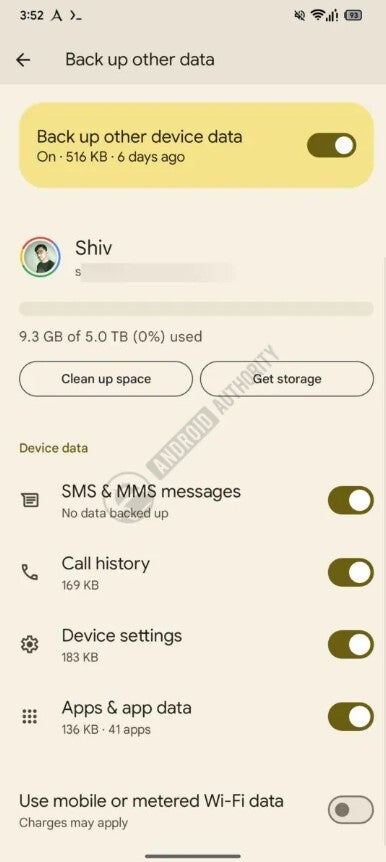
Individual toggles for each type of data. | Image by Android Authority
Google has apparently realized that not everyone wants all of their data to be backed up to the cloud. As such, they are reportedly working on giving you more control over what you really want to back up and what you don’t. The change has been spotted in the Google Play Services beta version 26.22.30.It has been spotted in the beta build that the backup tool lets you manually enable or disable the items that you want to back up from…
Source