Luminance wallpaper for iPhone: How to get it and set it up
Luminance wallpaper for iPhone: How to get it and set it up
https://www.cultofmac.com/how-to/luminance-wallpaper
Publish Date: 2026-05-13 09:18:00
Source Domain: www.cultofmac.com
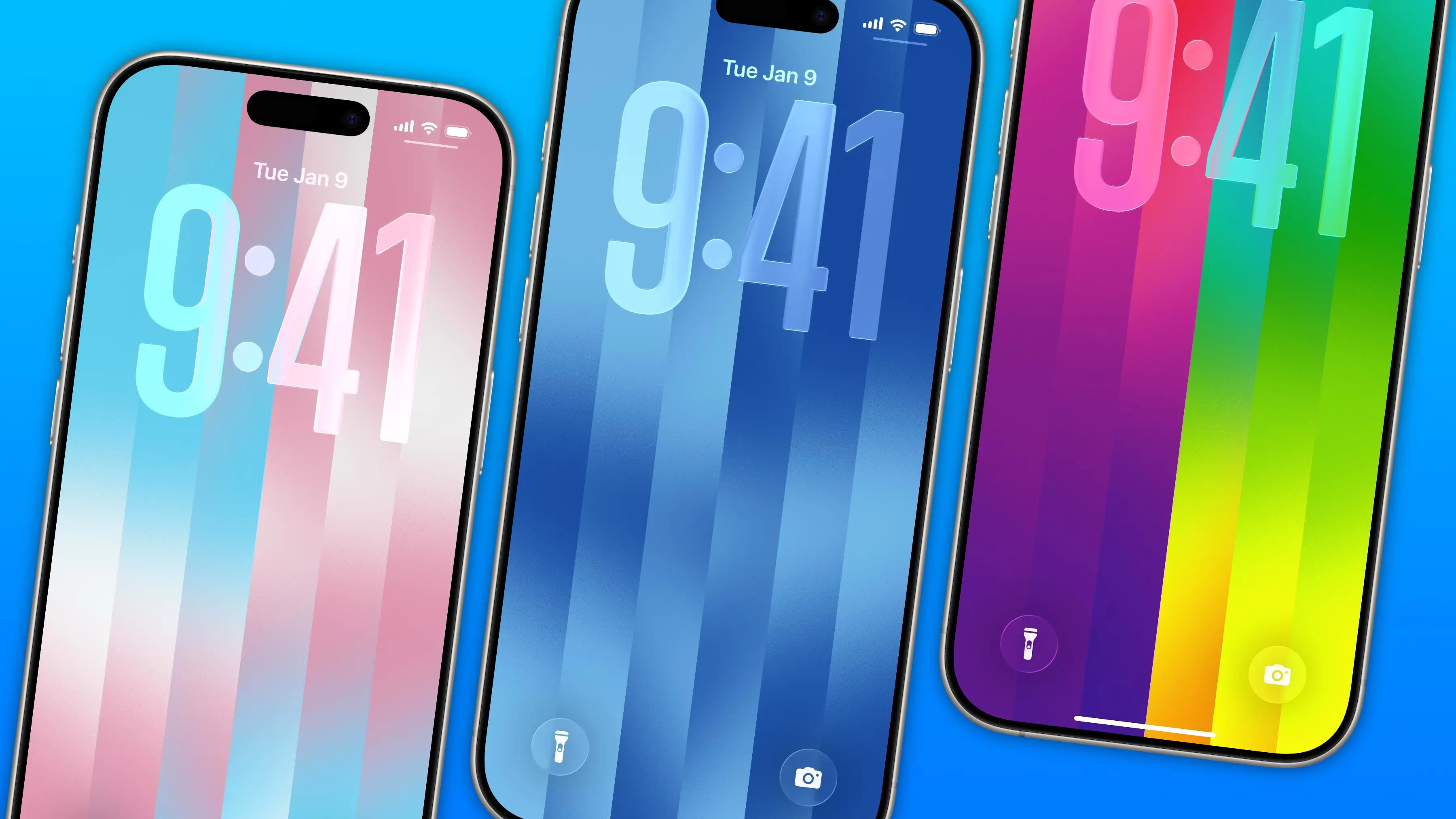
The colorful Pride Luminance wallpaper and watch face add beautiful color gradients to your iPhone and Apple Watch. You can download them both after updating to iOS 26.5 and watchOS 26.5.
Since they’re part of Apple’s annual Pride collection, they come with a bunch of preset styles for various pride flags. But you can customize the Lock Screen wallpaper and the Apple Watch face however you want. With a light and dark shade of the same color, the vertical stripes and gradients shimmer and animate when you swipe up to unlock your phone. Or you can go to the other extreme, picking up to 12 colors from the Luminance palette.
This is easily the best Pride wallpaper Apple has produced yet — in fact, it’s a great wallpaper, period.
How to set up Pride Luminance wallpaper in iOS 26.5
Apple’s Pride collection is a coordinated set of iPhone Lock Screens, Apple Watch faces and bands. This exercise in rainbow capitalism is an annual spring tradition for Apple. While some think the celebration rings hollow in light of Apple CEO Tim Cook’s proximity to President Donald Trump, it does occasionally produce a great watch band or wallpaper.
Everyone can appreciate the new Luminance Lock Screen, regardless of whether you’re gay, queer, trans or boring.
Table of contents: How to set up Pride Luminance wallpaper
- Update to iOS, iPadOS and watchOS 26.5
- Add the Pride wallpaper set
- Browse the built-in styles
- Create your own palette
- Add the matching watch face
- More iPhone customization features
Update to iOS, iPadOS and watchOS 26.5
Apple released the Pride Luminance wallpaper in iOS 26.5 on Monday. Go to Settings General Software Update to install it. It runs on all the same devices that run iOS 26: the iPhone 11 or later and iPhone SE (2nd generation) or later.
To run iPadOS 26, you’ll need at least an iPad (8th generation), iPad Air (3rd generation), iPad mini (5th generation), 11-inch iPad Pro or 12.9-inch iPad Pro (3rd generation).
For the…