Microsoft Teams phishing targets employees with A0Backdoor malware

Microsoft Teams phishing targets employees with A0Backdoor malware
Publish Date: 2026-03-09 18:50:00
Source Domain: www.bleepingcomputer.com
Hackers contacted employees at financial and healthcare organizations over Microsoft Teams to trick them into granting remote access through Quick Assist and deploy a new piece of malware called A0Backdoor.
The attacker relies on social engineering to gain the employee’s trust by first flooding their inbox with spam and then contacting them over Teams, pretending to be the company’s IT staff, offering assistance with the unwanted messages.
To obtain access to the target machine, the threat actor instructs the user to start a Quick Assist remote session, which is used to deploy a malicious toolset that includes digitally signed MSI installers hosted in a personal Microsoft cloud storage account.
According to researchers at cybersecurity company BlueVoyant, the malicious MSI files masquerade as Microsoft Teams components and the CrossDeviceService, a legitimate Windows tool used by the Phone Link app.
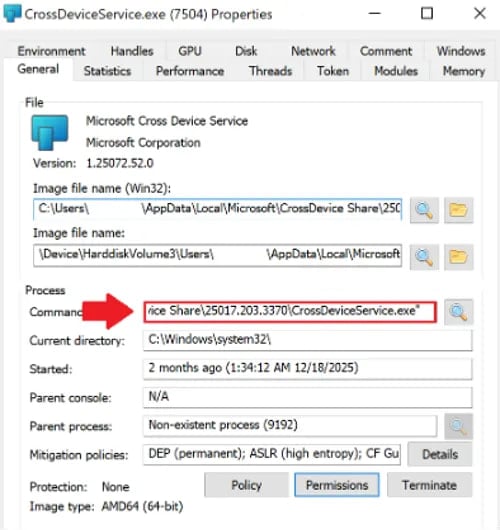 Command line argument to install the malicious CrossDeviceService.exe
Source: BlueVoyant
Using the DLL sideloading technique with legitimate Microsoft binaries, the attacker deploys a malicious library (hostfxr.dll) that contains compressed or encrypted data. Once loaded in memory, the library decrypts the data into shellcode and transfers execution to it.
The researchers say that the malicious library also uses the CreateThread function to prevent analysis. BlueVoyant explains that the excessive thread creation could cause a debugger to crash, but it does not have a significant impact under normal execution.
The shellcode performs sandbox detection and then generates a SHA-256-derived key, which it uses to extract the A0Backdoor, which is encrypted using the AES algorithm.
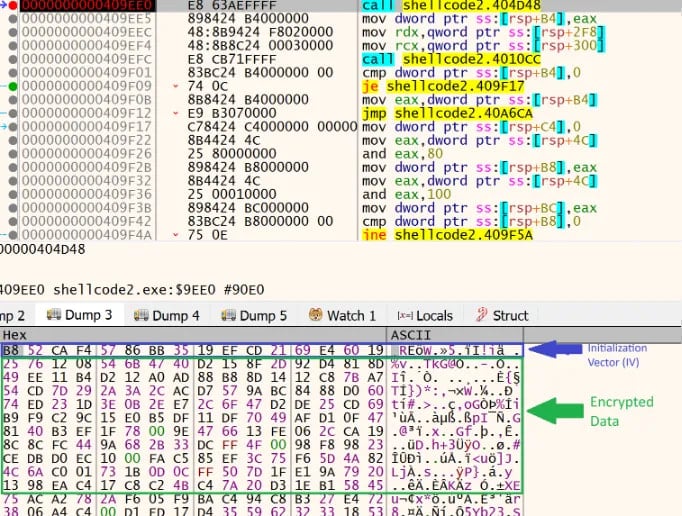 Encrypted payload in the shellcode
Source: BlueVoyant
The malware relocates itself into a new memory region, decrypts its core routines, and relies on Windows API calls (e.g., DeviceIoControl, GetUserNameExW, and GetComputerNameW) to collect information about the host and…