New to Linux? These 4 systemd Tools Help You Fix Common Issues

New to Linux? These 4 systemd Tools Help You Fix Common Issues
https://itsfoss.com/systemd-troubleshoot-tools/
Publish Date: 2026-03-01 10:41:00
Source Domain: itsfoss.com
If you’ve spent any time in the Linux community, you know that systemd is a hot topic. Some people love it because it handles everything; others wish it didn’t! But here’s the reality: almost every major Linux distribution (like Ubuntu, Fedora, and Debian) uses it today.
Think of systemd as the “manager” of your computer. When something goes wrong, like your Wi-Fi won’t connect or a creative app keeps crashing, systemd is the one with all the answers.
But where to find those answers? systemd has built-in tools that help you troubleshoot issues with your system. If you’re just starting your Linux journey, I recommend exploring the following four tools.
1. Systemctl
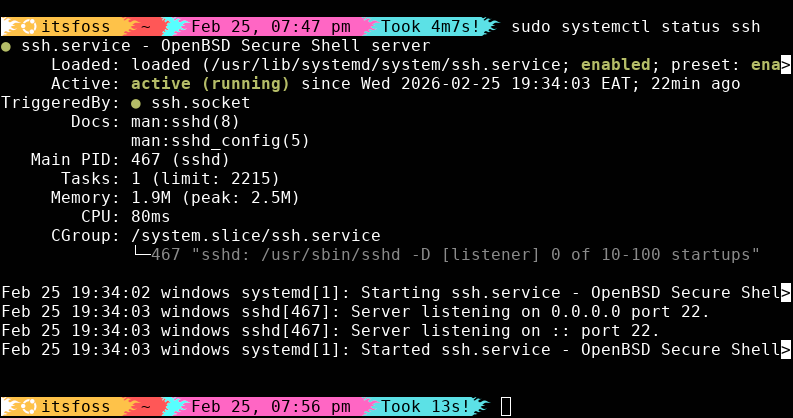
In Linux, background apps are called services. If your system is not accepting SSH connections, you use systemctl to see what’s happening under the hood.
I mean, before you try to fix something, you need to know if it’s actually broken.
sudo systemctl status ssh
This is the most important command in a Linux user’s toolkit. When you run it, pay attention to the Active line:
- Active (running): Everything is great!
- Inactive (dead): The service is off. Maybe it crashed, or maybe you never turned it on.
- Failed: This is the red flag. systemd will usually give you a “Main PID” (Process ID) and a reason for the failure right there in the terminal.
The “turn it off and on again” trick
We’ve all heard it: “Have you tried restarting it?” Restart a service in Linux with systemctl.
- Kickstart a failed one: sudo systemctl start ssh
- Stop a lagging service: sudo systemctl stop ssh
- Reset: sudo systemctl restart ssh
- Disable a service (to speed up boot): sudo systemctl disable ssh
2. Journalctl
When an app crashes, it doesn’t just vanish. It usually screams an error message into the void. Journalctl is the tool that catches those screams and saves them in a “journal” for you to read later.
Unlike old-school Linux logs (which were scattered across dozens of text files), systemd keeps…